I may have changed the hardware, switching from an Arduino to a Raspberry Pi. I have good reasons for that, which I'll tell you in a later post. Today, I want to revisit the subject of 3D modeling software.
You will recall that in my previous article about 3D CAD, I mentioned SolidWorks, Tinkercad, SketchUp, Wings 3D, and Microsoft 3D Builder. I haven't tried SolidWorks, because it costs money and I'm cheap. I tried the other four alternatives, and all of them had serious shortcomings. Tinkercad and 3D Builder were so inadequate that I couldn't even take them seriously. Wings 3D is very powerful, but it has a painful and steep learning curve, and all I want to do is design and 3D-print a small enclosure for my project. SketchUp has the power I need, but some of the features I really want to access are hidden behind a paywall.
So, back to the (ahem) drawing board I went. This time, I found just what I was looking for.
(Yet another detour: I've gotten so used to the Linux command line, that I do a lot of graphics work directly in text files. I mean, I write web pages in raw HTML/Javascript/MarkDown/other stuff. I write formatted and typesetted technical documents in LaTeX. For business and technical graphics, I use GraphViz. I use the command-line version of ImageMagick to manipulate existing images.
And back in the Good Old Days, I used to use the DOS version of WordPerfect with "Reveal Codes" turned on, and I would edit the codes manually. Also back in the good old days, before WISYWIG editors, and before I learned LaTeX, I used to use troff and Interleaf LISP to create typesetted documents. Oh yeah, and I used to write raw HPGL and Logo to do vector graphics - you know, line drawings. Stone knives and bearskins. Old man's voice: "And we liked it! *ptui*")
All of that, just to say that I'm very comfortable with manipulating text-based input to produce graphical output. So I happened across a beautiful little 3D CAD program called OpenSCAD.
 |
| An OpenSCAD screenshot |
 | |
| Another OpenSCAD screenshot, showing the three panes |
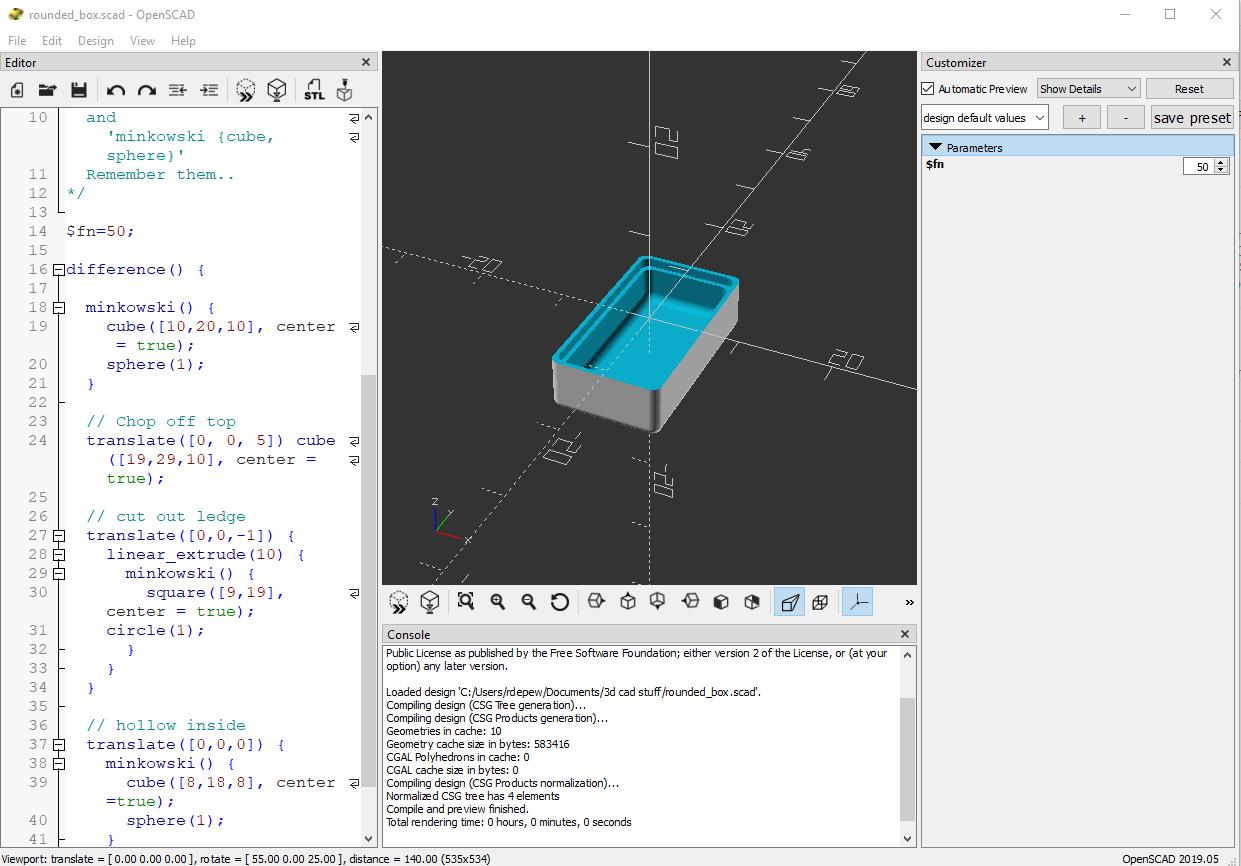
OpenSCAD doesn't look like much. It has a window with three panes. On the left is the Editor, where you write the text that defines your part: "Put a cube here. Put a cylinder there. Drill a hole in the cylinder." In the center is the Viewer, where you can see your creation from different angles and at different distances. On the right is the Customizer, a neat little thing you can use to modify your design on the fly without having to rewrite the text in the Editor window.
Creating a model in OpenSCAD is like writing a program. If you've used modern scripting languages like Python or JavaScript, it will feel familiar to you. Pressing F5 or F6 to draw your design is like compiling a program. If you've used compiled languages like C or C++, this will also feel familiar to you. And if you get the programming wrong, OpenSCAD will give you an error message and point you to the line where the error was detected. If you've ever done any programming in your life, I'm certain that this will feel familiar to you.
One of the things that I like best about OpenSCAD is that you can minimize the Editor and Customizer panes, leaving just the Viewer pane, and do your editing in your own favorite editor, in a separate window. Being a Vim fan, I open a terminal window and bang away in Vim. Every time I save the file, OpenSCAD detects that the file has changed, and it computes and displays the new object.
 |
| OpenSCAD in use. That's my GVIM editor on the left. (I'll tell you about the hardware in the enclosure in a later post.) |
OpenSCAD can export shapes in a variety of file formats, the most important of which is STL (short for stereolithography, a fancy word for "3D printing"), the format preferred by 3D printing services. Cura LE, from Lulzbot, takes an STL file and converts it into the "slices" required by a 3D printer.
 |
| Cura LE (Lulzbot Edition) |
Now, here's a new player in the game: FreeCAD. One OpenSCAD user reported that OpenSCAD can occasionally mess up an STL file, and the model will not render properly in Cura. He suggests using FreeCAD as an intermediary between OpenSCAD and Cura.
FreeCAD is a relative newcomer to the 3D design world. It's actually been around since 2002, but it didn't become a serious contender until Release 0.14, in 2014. Even today, at Release 0.18, its makers warn that it's still not ready for prime time, but it's a very good parametric 3D modeling package.
 |
| FreeCAD screenshot |
(Very technical aside: FreeCAD uses the parametric 3D design paradigm, while OpenSCAD uses the constructive solid geometry (CSG) paradigm. I barely know what those words mean, but I do know that my brain wraps more easily around CSG than parametric design. You may feel differently, and if you do, then you should skip OpenSCAD and use FreeCAD directly. I'm serious.)
So my design path now goes like this:
1. Design the thing using OpenSCAD.
2. Import the SCAD file into FreeCAD, and export it as an STL file.
3. Open the STL file in Cura LE and prepare it for printing.
It works for me. And the price is right.
If I weren't so cheap, I could spend real money and get one piece of software that does it all for me. But if I had that much money, I'd also buy my own 3D printer. And a OneWheel.
Postscript: Are you wishing I had included a weblink for something that I mentioned? Like SketchUp? Or ImageMagick? Some of these items have links in my previous post on this subject. For the others, you'll have to do a Web search. I'm sorry. I got tired of typing.
Postscript: Are you wishing I had included a weblink for something that I mentioned? Like SketchUp? Or ImageMagick? Some of these items have links in my previous post on this subject. For the others, you'll have to do a Web search. I'm sorry. I got tired of typing.
To read the other postings about this project, click here and scroll to the end.


