Showing posts with label Raspberry Pi. Show all posts

Wednesday, January 8, 2020

Arduino Project One: Secure communications through the firewall

Bad luck: I broke the camera connector on my Raspberry Pi Zero W, and then I think I zapped the Pi itself. It's dead, Jim. Fortunately, I have a Pi 3B lying around, waiting to be useful, so I think I'll press it into service.

My original plan was to set up a web page on the Pi, and to communicate with the Pi through a browser or a smartphone app. That would entail setting up port forwarding on my home network's router, or as they say, "punching a hole in the firewall." And that's always a network security risk.

Today, a co-worker gave me a better idea. It stems from the work I'm doing at FreeWave with MQTT.

Use MQTT to talk to the garage door

MQTT is a data communications protocol used widely in the Internet of Things (IoT) —the world of connected appliances, automobiles, doorbells, and so on. It's intended for sporadic communication of small amounts of data, perfect for this application.

MQTT follows a client-server model. However, the server doesn't really save the data: it just receives it from clients who send it data (that's called publishing), and distributes it to other clients that have asked to see the data (or subscribed to it). It doesn't actually save any data; it's just a go-between. For this reason, the server is more of a broker than a server.

A good, widely used, open-source MQTT broker is Mosquitto. Mosquitto is ridiculously simple to set up and run in the background. So I will set up Mosquitto to run on a cloud server somewhere.

The Raspberry Pi will subscribe to garage-door-opener messages received by the broker. It will publish a couple of messages of its own, in response to the messages it receives. I can use a Corona app, a webpage, or a Python or JavaScript script to publish messages to the broker.

By setting it up this way, I can totally bypass my router.

Messages to send to the Pi:
  • Request status of the garage door (closed, or not closed)
  • Push the button, Max.
Messages to be sent by the Pi:
  • Status of the garage door is closed, or not closed
    • ... including a camera image
  • The button has been pushed 
Data security is still a concern

MQTT transactions can be sent as binary data or as plain text. Anybody who knows the MQTT broker's IP address can snoop on the MQTT messages. Once they know the message tags, they can subscribe to those tags and intercept the data. If they can intercept the data, there's the chance that they can hack the system. At the very least, they can know the status of my garage door and maybe see what's in my garage. At worst, they can open and close the door at will.

An MQTT message can contain one or more metrics, the data items being transmitted. I can encrypt the data, and then send both the encrypted data and an encryption key, so the subscriber will have to utilize the key to decrypt the data. But if I do that for the "Push the button, Max" message, then a hacker can just copy the message and use it as is to push the button. I need a key that will change regularly, and that only the Raspberry Pi knows.

So another idea is to use a challenge-response algorithm, something like this.

Me: Hey, garage door. I want you to—
Pi: Wait wait wait, here's a randomly generated key. Use it to encode your message.

Me: Here's a huge number, which I created from your randomly generated key to prove that I'm me, and my request, which I encrypted using your randomly generated key.

Pi: Good, that's the right number. Now I know that you're you. Here's a response to your message, also encrypted using the randomly generated key.

Me: Thanks. We're done.

The idea of the Pi generating a random key, and both the Pi and the client using that key to generate an encryption key, has some holes in it. The NSA can hack something like that pretty quickly, if they can figure out the key-generation algorithm. But it might be enough to defeat neighborhood hackers. I think it's at least as secure as the mechanical lock-and-key on my front door.

Counting cards

Even if a hacker can't decrypt the messages, he might be able to deduce from the pattern of messages that someone is trying to operate the garage door opener. Since the normal state of the door is closed, if a hacker sees two clusters of messages a few minutes apart, for example, he can reasonably deduce that the garage door was opened and then closed. And if the hacker sees only one cluster of messages, with no other action for a while, he can reasonably deduce that the door's status was checked, but not changed.

It's like counting cards at the blackjack table.

So it might be a good idea to have the client and the Pi swap some bogus messages once in a while, encoded, of course, and the same size as real messages, to confuse any hackers monitoring the broker.


To read the other postings about this project, click here and scroll to the end.

Thursday, August 15, 2019

Arduino Project One: Revived - and another detour into 3D printing

The last installment in the story of my Arduino-controlled garage door opener was in November 2017, almost two years ago. The project stalled, not for any reasons of its own, but because of the distractions of everyday life. Now I can finally get back to it.

I may have changed the hardware, switching from an Arduino to a Raspberry Pi. I have good reasons for that, which I'll tell you in a later post. Today, I want to revisit the subject of 3D modeling software.

You will recall that in my previous article about 3D CAD, I mentioned SolidWorks, Tinkercad, SketchUp, Wings 3D, and Microsoft 3D Builder. I haven't tried SolidWorks, because it costs money and I'm cheap. I tried the other four alternatives, and all of them had serious shortcomings. Tinkercad and 3D Builder were so inadequate that I couldn't even take them seriously. Wings 3D is very powerful, but it has a painful and steep learning curve, and all I want to do is design and 3D-print a small enclosure for my project. SketchUp has the power I need, but some of the features I really want to access are hidden behind a paywall.

So, back to the (ahem) drawing board I went. This time, I found just what I was looking for.

(Yet another detour: I've gotten so used to the Linux command line, that I do a lot of graphics work directly in text files. I mean, I write web pages in raw HTML/Javascript/MarkDown/other stuff. I write formatted and typesetted technical documents in LaTeX. For business and technical graphics, I use GraphViz. I use the command-line version of ImageMagick to manipulate existing images. 

And back in the Good Old Days, I used to use the DOS version of WordPerfect with "Reveal Codes" turned on, and I would edit the codes manually. Also back in the good old days, before WISYWIG editors, and before I learned LaTeX, I used to use troff and Interleaf LISP to create typesetted documents. Oh yeah, and I used to write raw HPGL and Logo to do vector graphics - you know, line drawings. Stone knives and bearskins. Old man's voice: "And we liked it! *ptui*")

All of that, just to say that I'm very comfortable with manipulating text-based input to produce graphical output. So I happened across a beautiful little 3D CAD program called OpenSCAD

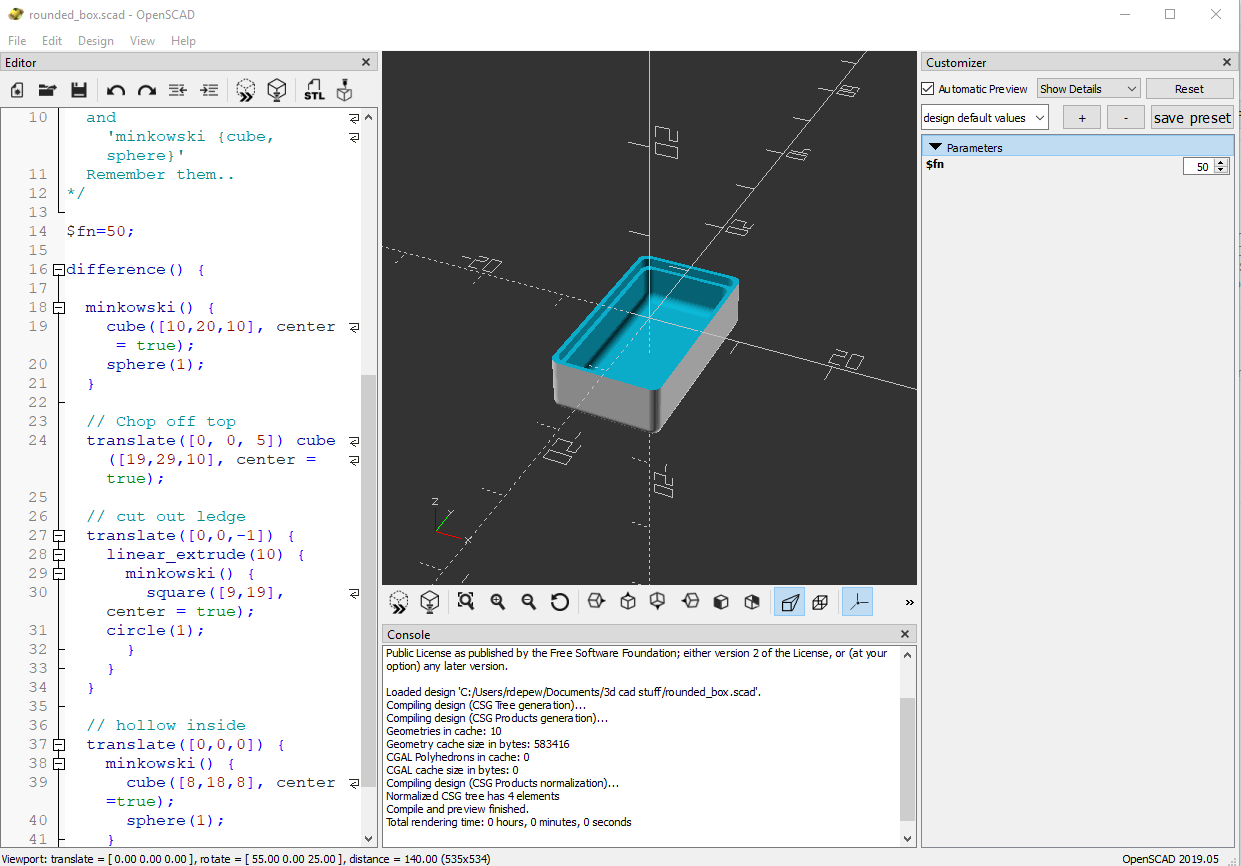
An OpenSCAD screenshot
Another OpenSCAD screenshot, showing the three panes

OpenSCAD doesn't look like much. It has a window with three panes. On the left is the Editor, where you write the text that defines your part: "Put a cube here. Put a cylinder there. Drill a hole in the cylinder." In the center is the Viewer, where you can see your creation from different angles and at different distances. On the right is the Customizer, a neat little thing you can use to modify your design on the fly without having to rewrite the text in the Editor window.

Creating a model in OpenSCAD is like writing a program. If you've used modern scripting languages like Python or JavaScript, it will feel familiar to you. Pressing F5 or F6 to draw your design is like compiling a program. If you've used compiled languages like C or C++, this will also feel familiar to you. And if you get the programming wrong, OpenSCAD will give you an error message and point you to the line where the error was detected. If you've ever done any programming in your life, I'm certain that this will feel familiar to you.

One of the things that I like best about OpenSCAD is that you can minimize the Editor and Customizer panes, leaving just the Viewer pane, and do your editing in your own favorite editor, in a separate window. Being a Vim fan, I open a terminal window and bang away in Vim. Every time I save the file, OpenSCAD detects that the file has changed, and it computes and displays the new object.

OpenSCAD in use. That's my GVIM editor on the left.
(I'll tell you about the hardware in the enclosure in a later post.)
OpenSCAD can export shapes in a variety of file formats, the most important of which is STL (short for stereolithography, a fancy word for "3D printing"), the format preferred by 3D printing services. Cura LE, from Lulzbot, takes an STL file and converts it into the "slices" required by a 3D printer.

Cura LE (Lulzbot Edition)

Now, here's a new player in the game: FreeCAD. One OpenSCAD user reported that OpenSCAD can occasionally mess up an STL file, and the model will not render properly in Cura. He suggests using FreeCAD as an intermediary between OpenSCAD and Cura.

FreeCAD is a relative newcomer to the 3D design world. It's actually been around since 2002, but it didn't become a serious contender until Release 0.14, in 2014. Even today, at Release 0.18, its makers warn that it's still not ready for prime time, but it's a very good parametric 3D modeling package.

FreeCAD screenshot


(Very technical aside: FreeCAD uses the parametric 3D design paradigm, while OpenSCAD uses the constructive solid geometry (CSG) paradigm. I barely know what those words mean, but I do know that my brain wraps more easily around CSG than parametric design. You may feel differently, and if you do, then you should skip OpenSCAD and use FreeCAD directly. I'm serious.)

So my design path now goes like this:
1. Design the thing using OpenSCAD.
2. Import the SCAD file into FreeCAD, and export it as an STL file.
3. Open the STL file in Cura LE and prepare it for printing.

It works for me. And the price is right. 

If I weren't so cheap, I could spend real money and get one piece of software that does it all for me. But if I had that much money, I'd also buy my own 3D printer. And a OneWheel.

Postscript: Are you wishing I had included a weblink for something that I mentioned? Like SketchUp? Or ImageMagick? Some of these items have links in my previous post on this subject. For the others, you'll have to do a Web search. I'm sorry. I got tired of typing.


To read the other postings about this project, click here and scroll to the end.

Thursday, September 13, 2018

I like Swiss things

I like Swiss things. They're high quality, very impressive, and not always expensive.

- Swiss chocolate (especially Toblerone, but not just Toblerone)
- Swiss yogurt
- Swiss cheese (not just Ementaler and Gruyère - much more)
- Swiss watches
- Swiss Army knives (both Wenger and Victorinox)
- Swiss airplanes (Pilatus)
- The Swiss postal service
- Swiss railroads and trains
- The Swiss armed forces and military infrastructure
- Swiss mountains, Swiss lakes, Swiss cities, Swiss people
- Swiss computers

WHAT?! SWISS COMPUTERS?!

Where I work, we were looking for a single-board computer for a new project. Single-board computers, or SBCs, have gained popularity, thanks to names like Arduino, BeagleBone, and of course the great Raspberry Pi. But those are all hobby computers. We needed something with real horsepower.

We evaluated about a dozen different SBCs. Most of them were from Hong Kong or Shenzhen, China. Even though they had impressive specifications, we had serious concerns about their quality, reliability, engineering design, and workmanship. In addition, our SBC may have ended up in some government or military projects, and we had serious national-security concerns about designing something made in China into U.S. military equipment.

One of the last SBCs we evaluated, technically a system-on-module (SOM) and not an SBC, was from Toradex. When you go to the Toradex website, you see that they're based in Seattle. But when you dig a little deeper, you find that although Toradex USA is based in Seattle, the parent company is based in Switzerland. And you discover that their computers are designed and built in Switzerland.

Yep. All of our worries about quality, reliability, engineering, workmanship, and sourcing, just evaporated. The End.

Thursday, February 22, 2018

How to: Installing Kodi / LibreELEC on a Raspberry Pi with a 5-inch LCD display

I bought an Elecrow 5-inch LCD display on Amazon.com in December 2016, on one of their Lightning Deals, to install on a Raspberry Pi 2 Model B.

I finally got around to installing it on the Raspberry Pi. It works great. In fact, it works so well that I also installed it on a brand-new Raspberry Pi Zero W. (You want pictures? I'll add pictures. But the words are really important right now.) On both the Pi 2 B and the Pi Zero W, I was running the Raspbian OS. I'm sure it works just fine with Noobs, but I like Raspbian better.

I'll bet it works on a Raspberry Pi 3 as well.

But what I really wanted to do with it was run a home theatre system, specifically XBMC. XBMC is a wildly successful home theatre operating system. Actually, what used to be called XBMC is now called Kodi, and it's still wildly successful.

The Elecrow display and the Pi liked each other right from the start. I connected them, turned them on, and they played nicely together. Getting the software to run flawlessly on the combination took a bit more work.

Here are the steps to follow to get either Raspbian or the home theatre system working flawlessly with Raspberry Pi 2 Model B and an Elecrow display. These steps are also applicable to other Elecrow displays and other Raspberry Pi computers.

Installation on Raspbian OS


Under "Product Description" on the Amazon page, you will find these instructions:

  1. Download the Raspbian Stretch with Desktop image from the official Raspberry Pi downloads page. Don't bother with the Lite version. You want the real thing.
  2. If you use Etcher to write the image to your micro SD card, you won't even need to unzip the image. Etcher handles ZIP files, IMG files, TAR files, all of 'em. Etcher is the slickest program I've seen for SD cards and USB drives. It works on Mac, Linux or Windows PCs. You can get it from https://etcher.io/. (UPDATE: It's now https://www.balena.io/etcher/ .)
  3. Insert the micro SD card into your Pi.
  4. Plug the display into the Pi and power it up. Which "it" do I mean? Well, if you're using the Pi 2 or Pi 3, connecting power to either the display or the Pi will power up both of them. If you're using the Pi Zero, you'll need to connect power to the display first, and then to the Pi Zero.
  5. You will see the boot splash on the display, and the Pi will power up and run, but you will see that it only uses a 640 x 480 section of the display. Now you're going to teach it to use the full 800 x 480.
  6. Open a terminal window. Make sure git is installed on your Pi. If it isn't, use the command
    sudo apt-get install git
    to install it.
  7. Then use the command
    git clone https://github.com/Elecrow-keen/Elecrow-LCD5.git
    to download the driver.
  8. To install the driver, use these two commands:
    cd Elecrow-LCD5
    sudo ./Elecrow-LCD5
  9. You may need to reboot to make the change effective. I don't remember. I hope you don't. To reboot safely, use this command:
    sudo shutdown -r now
    (The "-r" means "just reboot, don't power off". The "now" means "don't wait; do it now".)
  10. To (optionally) calibrate the touchscreen, execute these two commands:
    sudo apt-get install xinput-calibrator
    xinput-calibrator
  11. Using the stylus supplied with the display, poke the four crosshairs as they appear on the screen.

Installation on Kodi / LibreELEC

First came XBMC. It was so wildly successful that it turned into Kodi. It was so wildly successful that it turned into OpenELEC. (Actually, OpenELEC is a tiny Linux OS made specifically to run Kodi, but let's not quibble over details, okay?) Then, because of "creative differences", a lot of developers abandoned OpenELEC and that's where LibreELEC came from. LibreELEC is a fork of OpenELEC.

OpenELEC was last updated in April 2017, and support for it is deteriorating. LibreElec was updated a few weeks ago. LibreELEC is alive and lovingly cared for. But it's still XBMC, Kodi, and OpenELEC deep in its bones.

  1. Follow the excellent instructions on LIbreELEC's own wiki to download and install the LibreELEC USB-SD Creator on your system: Mac, Linux, Windows, we don't care.
  2. Again, following the excellent instructions on that page, run the Creator program to download the appropriate version of LibreELEC onto your micro SD card.
  3. Insert the micro SD card into your Pi.
  4. Plug the display into the Pi and power it up. If you're using the Pi 2 or Pi 3, connecting power to either the display or the Pi will power up both of them. If you're using the Pi Zero, you'll need to connect power to the display first, and then to the Pi Zero.
  5. You will see the boot splash on the display, and the Pi will power up and run, but it only uses a 640 x 480 section of the display. Now things get tricky.
  6. At the top of the left-side menu are three icons: an on-off icon, a gear icon, and a search icon. Click the gear icon to bring up the Settings menu.
  7. Click the LibreELEC icon. It's probably in the lower left corner.
  8. In the LibreELEC menu, select Services. On the right-hand side, select Enable SSH. Make sure it's enabled.
  9. Still in the LibreELEC menu, select Connections. Write down the Address of your device. It will be something like "192.168.0.77".
  10. Leave the Pi alone for a while. Go to another computer and open an SSH connection to the Pi.
  11. If you're on Windows, use  Putty.
    Hostname: 192.68.0.77 (or whatever it says in the Connections menu)
    Port: 22
    Connection type: SSH
  12. When you click Open, Putty will give you a scary message. Select Yes.
    login as: root
    root@192.168.0.77's password: libreelec
  13. If you're on Linux, use a regular terminal window.
    ssh root@192.168.0.77
  14. If Linux gives you a scary message, follow the instructions. If it asks you a question, type "yes".
    root@192.168.0.77's password: libreelec
  15. Sorry, Mac users. You're on your own. But I'll bet it's a lot like the Linux instructions.
  16. Once you're in the SSH session:The files inside libreelec are read-only. Write protected. A simple "chmod +w" isn't going to do it for you. Again, follow the excellent instructions on this page of LibreELEC's wiki to unlock the config.txt file for editing.
  17. It occurs to me that that page may one day disappear. So here's what it says. Type this command to unlock the partition on the SD card:
    mount -o remount,rw /flash
  18. Then type one of these two commands to edit the file, depending on which editor you want to use. If you don't know what vi is, then choose nano.
    vi /flash/config.txt
    or
    nano /flash/config.txt
  19. Look for the line that says "hdmi_ignore_cec_init=1". 
  20. Copy and paste these lines into the config.txt file, just below that "hdmi_ignore..." line:

    #increase HDMI signal strength
    config_hdmi_boost=4
    #remove black borders
    disable_overscan=1
    #set specific CVT mode
    hdmi_cvt 800 480 60 6 0 0 0
    #set CVT as default
    hdmi_group=2
    hdmi_mode=87

    dtoverlay=ads7846,cs=1,penirq=25,penirq_pull=2,speed=50000,keep_vref_on=0,swapxy=0,pmax=255,xohms=150,xmin=200,xmax=3900,ymin=200,ymax=3900

    dtoverlay=w1-gpio-pullup,gpiopin=4,extpullup=1
  21. SPECIAL NOTE: That "dtoverlay" line is all one long, long line! Don't break it up like Blogspot did!
  22. Save the file and exit the editor.
  23. Lock the partition:
    mount -o remount,ro /flash
  24. Reboot the system:
    reboot
  25. You should see the boot splash screen centered in the display, and when LibreELEC comes up, you should see it fill the entire display.

Thanks to:

  • Elecrow, for putting the instructions right on the product page at Amazon.com.
  • Amazon.com, of course.
  • @Auvy and the other commenters on the product page at Amazon.com, who added their technical advice. I had to choose one, and @Auvy's worked.
  • LibreELEC for the excellent instructions on their wiki, and for their SD Creator program.
  • Etcher.io, for their SD creator program.
  • RaspberryPi.org, of course.

Friday, March 30, 2012

Raspberry Pi: Don't give up yet

I've already written five articles about the credit-card-sized educational computer, the Raspberry Pi. As you know, the first 10,000 units were supposed to go on sale a month ago. A few unfortunate things got in the way.

First, they didn't ship from the factory in China when they were supposed to, for a number of reasons. One key reason was that the factory in China had substituted a cheaper part for one of the specified parts, and the units didn't even work. They all had to be reworked.

Second, the Raspberry Pi Foundation, the nonprofit org who conceived and designed this computer as a way to get REAL computer education back into the classroom, started to realize (too late!) that they had underestimated demand, and that their servers would not be able to handle the orders that would come pouring in on March 1st, and so they engaged a couple of worldwide partners to handle the ordering for them. Their partners didn't take the RasPi people seriously, when the RasPi people told them how big the demand was going to be, and so when the gates opened and customers rushed in, the crush of requests shut down the distributors' servers.

Once again: how badly had RasPi, Newark/Farnell/element14 and RS/Allied Electronics underestimated things? Well, the first production run was for 10,000 units. RasPi estimated they'd have 100,000 people wanting to order those 10,000 units. Actual demand turned out to be more like 2,000,000 people. That's TWO MILLION PEOPLE.

Maybe they should be embarrassed. Maybe dismayed. But what they were (and still are, if you read between the lines) is stunned - stunned that they created something with so much appeal. More on that later.

Third, the RasPi principals were expecting the initial 10,000 units to go, not to schools, but to engineers and developers who would produce all the programs and accessories to go with the computer. When they and their distribution partners looked at the demographics (and the GEOgraphics) of those 2,000,000 potential customers, they realized that it wasn't just engineers and developers clamoring for the product. Even though the computer was a bare board, not even in a case, and even though the Foundation were planning on tweaking the design based on feeedback from the first 10,000 users, EVERYBODY WANTED ONE. The general public. The hoi polloi. Regular people. So their partners insisted that they had to get CE and FCC certification for it before they could sell it.

That's unfortunate, but it was something they would eventually need to do anyway, and so it's good that they're taking care of it now. Unfortunate, because that testing ain't cheap, and you don't recover the costs of it until you start shipping product.

So, yeah: delays. But the Raspberry Pi computer is notvaporware! The Foundation have posted photos of the first shipment of 2000 items, on their website. It is for real, and 2000 customers will be very happy, very soon. As soon as the CE approval is granted, that is.

Okay, now back to the creators' emotional reaction to the massive worldwide demand. Believe it or not, they created this computer for altruistic reasons. They're not in it to get rich. They incorporated as a nonprofit org, and all the money they make will go back into the project. I don't think they expected two million people around the world to see the potential in their design, and go crazy over it. The Raspberry Pi is a rock star, and it hasn't even released its first album yet. It's a worldwide phenomenon. It's bigger than its creator's wildest dreams. Yeah, I would expect them to be stunned.

So we can forgive them for stumbling on the product release. They've never done anything like this before, and they're learning as they go along. But if you track their progress on their website or in the Allied/RS forums, you'll see that they're terribly serious about this project and intent on doing it right.

In the USA, Newark/element14 are taking orders, and quoting delivery dates in August.  Allied Electronics are not taking orders, but RS Components (the UK/Europe version of Allied Electronics) are talking about setting up a dedicated "Order your Raspberry Pi here" webpage, which will make it easier for individuals to order the units as they become available.

Wherever you end up ordering from, it will be worth the wait. Trust me on this.

p.s. "The creators" are not nameless, faceless people. You can read about them — and read their words! — on the http://www.raspberrypi.org website.
p.p.s. Kudos to the guy posting tutorial videos on YouTube, under the name RaspberryPiTutorials . He helped me fix a couple of virtual machines (totally unrelated to RasPi) that I've been fighting with for a while.

Monday, March 5, 2012

Raspberry Pi rollout: I'm irritated but I still want one

News reports that the new Raspberry Pi single-board computer sold out in minutes are inaccurate. The first batch of 10,000 units sold out in seconds, not minutes. According to actual data collected by the Raspberry Pi Foundation, Farnell/Newark/Element14, and RS Online/Allied Electronics, projected demand was about 100,000 units (10X supply), and actual demand was 1,000,000 units (100X supply, and 10X projected demand). The rush of people worldwide trying to buy one brought the Farnell and RS servers to their knees. It looked like a DDoS attack on the servers. It was the electronic equivalent of shoppers rioting at a toy store.

I think that the Foundation knew something big was going to happen, but they had no idea it would be this big. And they were unable to convince their new partners to take their advance warnings seriously. The Foundation and their commercial partners deserve some measure of the scorn that has been heaped upon them.

But they also deserve all of the applause that they've gotten. Why? Because the RasPi is a revolutionary idea  world-changing, even  and the real thing looks like a fantastic product. This is something that's never been tried before. Although the RasPi was aimed at teachers and students, interest in it has gone way beyond that intended market. The Foundation is new at this sort of thing, and they will make several more mistakes before they get it right. But I have confidence that will learn as they go, and they'll eventually get it right. And one day, eventually, (as soon as possible!) I will own a RasPi.

Until then, I remain irritated.

  • Irritated that I couldn't get one on the first day.
  • Irritated that the reason I couldn't get one was because of the mistakes of others.
  • Irritated that the http://www.raspberrypi.org/ website doesn't work during daylight hours in North America.
  • Irritated that I can't even order one right now. (And neither can anybody else.)

But I'll get over it. And I wish them luck.

UPDATE, 12 MARCH 2012: Over the weekend, the website was moved to a different server. Now I can get it day or night, all week long. Cross off irritation number 3, and thank raspberrypi.org and their hosting partner.

UPDATE, 15 MARCH 2012: I had written that actual demand was 1,000,000 units. That was based on the initial data collected on the first day of sales. Now we have some updated numbers. Based on those who "registered an interest" with their two distributors, actual demand exceeds 2,000,000 units. Granted, many, if not all, of those are people (like me) who registered with both distributors, but from what I've read, most potential customers (like me) want to buy multiple units. So I think that the "more than 2,000,000" figure is accurate.

Tuesday, February 28, 2012

Raspberry Pi launch falls flat

Well, the Raspberry Pi computer officially went on sale today, at 0600 GMT. Customers in the UK and Western Europe had to get up early for the launch; customers in the USA had to stay up late. It was a good time to do the launch: had they done it during business hours on either continent, they would have brought the entire worldwide Internet crashing down around them. As it is, three sites - their own, and two commercial ones - were completely overwhelmed and froze solid for the better part of an hour, and the computer sold out completely in less than a minute.

I think that the good folks at the Raspberry Pi Foundation underestimated both the demand and the enthusiasm for this product. They had some idea what would hit them: they were smart enough to sign up a couple of distributors with worldwide reach to manufacture and distribute the RasPi. But so many people wanted one of the first batch of 10,000 units that they crashed the Raspberry Pi Foundation's .org and .com servers, and they nearly crashed the servers at Premier Farnell and RS Components. I don't know about RS Components, but Farnell has an international presence, doing business as Newark on this side of the Pond, and as Element 14 on both sides of the Pond, and even the Element 14 webpage was having trouble.

According to the @RaspberryPi Twitter feed, Farnell sold out of their units in about one minute, and RS Components refuses to ship their units overseas.

While I am disappointed that I didn't get one of the first 10,000 units, I am pleased that the launch was so overwhelmingly successful. If the RPi Foundation had as much capital behind it as, say, Apple or Microsoft, and the manpower to match them, even if only for 24 hours, the launch would have gone more smoothly. But they're a small nonprofit organization, trying to do this on a shoestring budget.

By this time tomorrow, they'll have a bustling community of 10,000 users, with thousands more trying to get in. Let's hope that Farnell and RS get tooled up quickly, and that the Foundation recovers quickly from the shock and gets moving again.

Monday, February 20, 2012

Raspberry Pi: drooling in anticipation

Well, the 10,000 units of the Raspberry Pi Model B's first run are now in the hands of the testers. That means that we should be seeing a notice of sale in the next few days. The excitement is building over at http://www.raspberrypi.org/ and elsewhere.

And rightfully so. For the nerds among us, the recommended OS for the RasPi will be a remix of Fedora Linux. There are already several other OSes out there, also ready to go. I suggest you buy a handful of Sandisk 2 GB SD cards and put a different OS on each.

Just imagine: all the power of Linux, OpenGL, HDMI, and 10/100baseT, in a $35 package.

Thursday, February 9, 2012

About apples, raspberry pies, and Italian kings

We had a raspberry bush at our house in Oregon. It started as a single slip, taken from a wild bush and transplanted into our backyard. It loved the wet weather, and it grew rapidly. Over the years, it expanded to take over an entire side of the backyard fence, even crawling under the fence and coming up on the other side. If we had let it, it would have taken over the entire backyard.

I'm not complaining. It bore lots and lots of delicious fruit, most of which was eaten right there at the bush.

The Raspberry Pi was stuck in my head all night long. I couldn't stop thinking about it. (I still want one, by the way.)

I can see the RasPi becoming the Next Big Thing. It's starting out as a bare-bones educational computer, sold at no profit. The entity making and selling it, the Raspberry Pi Foundation, is determined to keep it that way. But I can imagine it becoming more popular than anybody expected, and selling hundreds of thousands - maybe millions.

Eventually, the Foundation will find it profitable to put a version of it in a case, dress it up, and sell it for a hundred dollars or more. The profit from this version will enable them to drop the educational price, thereby offering it to even more teachers and students than before.

Then they will find it even more profitable to license the technology to other manufacturers. This will cause the commercial RasPi platform to expand like my raspberry bush. It will also cause the platform to fragment, like the IBM PC did, which may or may not be a Bad Thing. But on the other end, since they are a non-profit entity, the gobs of money they make from the licensing deals will allow the Foundation to lower the price on the educational model even more, making it even more accessible.

Okay, that's my vision, not theirs. In a way, RasPi is similar to early Apple Computer. Remember the Apple II? (Actually, most of you don't. Tch. Kids.) Well, the Raspberry Pi is also named after a fruit, and  the capitalized Greek letter Π looks a lot like the Roman numeral II.  Like the RasPi, the Apple II was a hobbyist's computer whose popularity turned the computing world upside-down and laid the foundation for both the Macintosh and the IBM PC. I look for something similar to happen with the RasPi. If they weren't a private foundation, I'd buy a slice of the company. As it stands, all I can give them is praise and publicity. Oh - and my business.

There's another single-board computer out there, also taking the world by storm. Arduino began in 2005 as an educational computer, for students to use with their design and control projects (robotics, for instance). According to Wikipedia, in May 2011 there were 300,000 Arduinos in the wild. However, Arduino and the RasPi are distinctly different. The RasPi is meant to replace the desktop (or laptop) computer, with keyboard, display, and mass storage device(s). Arduino is a microcontroller, meant to control robots, giant billboards, 3D printers, coffee makers - you get the picture. They don't compete - if anything, they coexist.

You can connect an Arduino-equipped appliance to a RasPi computer. In fact, in the near future, you will be able to program an Arduino board from a RasPi board. Now that's cool.


The Apple II moved successfully from the hobbyist and educational worlds to the Real World, and opened the way for others to follow. Arduino moved quietly and successfully from the educational and hobbyist worlds to the Real World. Arduinos are everywhere, but you probably don't know it. The Raspberry Pi will do the same thing. I don't expect it to displace the Mac/Windows/BigLinux boxes, but it will definitely claim its place on the stage.


Wednesday, February 8, 2012

Get a whole computer for US$35. Yes, really!


Have you heard about the $35 computer? It's for real, and I want one.

Actually, the $35 Raspberry Pi Model B is still vaporware, but the $25 Model A is selling RIGHT NOW. The Model B won't be vaporware for long. The first production run of Model B is expected to ship this month, and at 10,000 units, it will sell out fast.

I want one.

The Raspberry Pi computer is the brainchild of Eben Upton, a former professor at Cambridge University in the UK. In 2006, Upton and several of his colleagues had noticed that the skill level of incoming Computer Science students had been falling gradually over the years. As they puzzled over what to do about it, they came up with the idea of a credit-card-sized computer, which could be sold cheaply enough that literally any student could afford it. The hardware would be simple enough that anybody could learn to program it.

They decided that the project should be managed, and the computer should be sold, by a nonprofit corporation. This would help them to keep costs down and to keep focused on the original objective. The result: the Raspberry Pi Foundation, led by Upton, and their product, the Raspberry Pi computer.

This is an awesome piece of hardware. Unfortunately, it's not for everybody. Keep your Macs and your PCs; this may not be the computer for you. While it has Ethernet and HDMI capability, it does not have a hard disk drive. (But you can attach a USB hard disk drive!) It's not even in a case yet! (I'm gonna build a case for it out of Legos. Or maybe popsicle sticks.) It will not run Windows, Mac OS X, or Android. It will not run any commercial software (yet). It runs Linux.

I want one.

Want to know more? Read an article about Raspberry Pi at Yahoo! News. Then go straight to the project's own website.