Showing posts with label ipod touch. Show all posts

Thursday, December 4, 2014

Two great apps for Android

Let me tell you about two great drawing programs for Android: Markers and Autodesk SketchBook.

Apple device users have long had access to a quick-and-dirty drawing app called Jot!, and a more complicated app from Autodesk, called Sketchbook. I was so pleased with both apps that I once wrote an article recommending them to you.

I've been looking in vain, for over a year, for an Android app to match Jot! which, unfortunately, is an iOS-only app. I think I finally found it.

With the unassuming name of "Markers," this app sticks to the fundamentals: it lets you do quick-and-dirty sketches. You can change brush sizes, styles and colors, but the selection is intentionally kept small, to keep the application simple and uncluttered. It's not really fair to do a feature-by-feature comparison of Markers to Jot!, because one only works on Android and the other only works on iOS.

(It turns out that Markers has been around for over two years. I don't know how I missed it, but I'm glad I finally found it.)

Some of the nice features of Markers:
  • It's pressure-sensitive, varying line width according to how hard you press on the glass.
  • The background is transparent, not white, so you can draw with a white marker.
  • If you draw with two fingers, you get two lines; three fingers gives you three lines and so on, up to whatever limitations your hardware imposes.
  • You can zoom and pan the drawing surface - very useful if you start getting complicated.
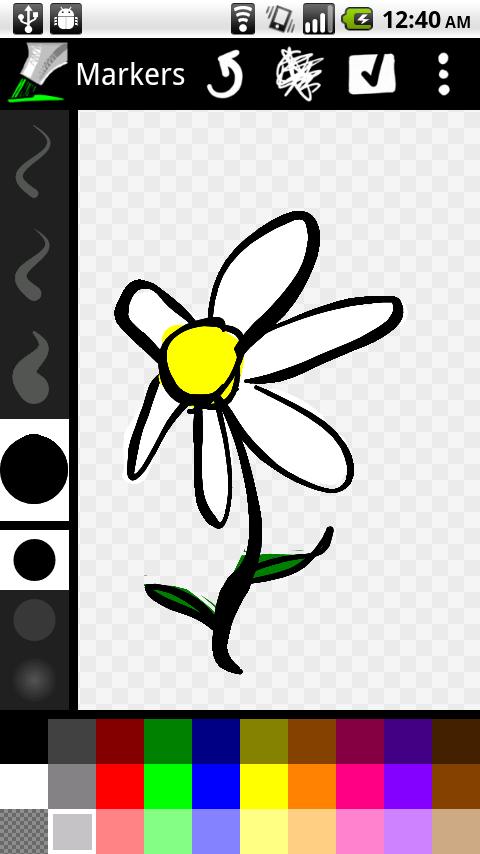
Markers - screenshot
A sample Markers screen. If you click on the green marker in the upper left corner, the menu disappears, leaving you with a full-screen drawing surface.

Jot! for iOS is available in both a free and a paid version; the paid version gives you extra exporting and sharing capabilities. Markers for Android is simply free. The author, Daniel Sandler, keeps a small website devoted to the project, at https://code.google.com/p/markers-for-android/. You can download Markers from the Google Play app store. Follow this link: https://play.google.com/store/apps/details?id=org.dsandler.apps.markers.

Now, let me tell you about SketchBook.

Autodesk knows how to follow the income stream. Their SketchBook app is available on both Android and iOS devices. As far as I have been able to tell, the app behaves identically on both platforms. SketchBook comes in three flavors:
  • SketchBook Express, free and good enough for casual users
  • SketchBook, also free but frustrating until you upgrade to Pro
  • SketchBook Pro, $3.99
For casual users, SketchBook Express will fill all your needs, but Markers is easier to use. Serious users will want SketchBook Pro. You don't download and install SketchBook Pro directly. You install SketchBook, and then you buy the Pro Tools inside the app. Installing the Pro Tools is what turns SketchBook into SketchBook Pro. Believe me, for four bucks, it's worth upgrading to the Pro version.

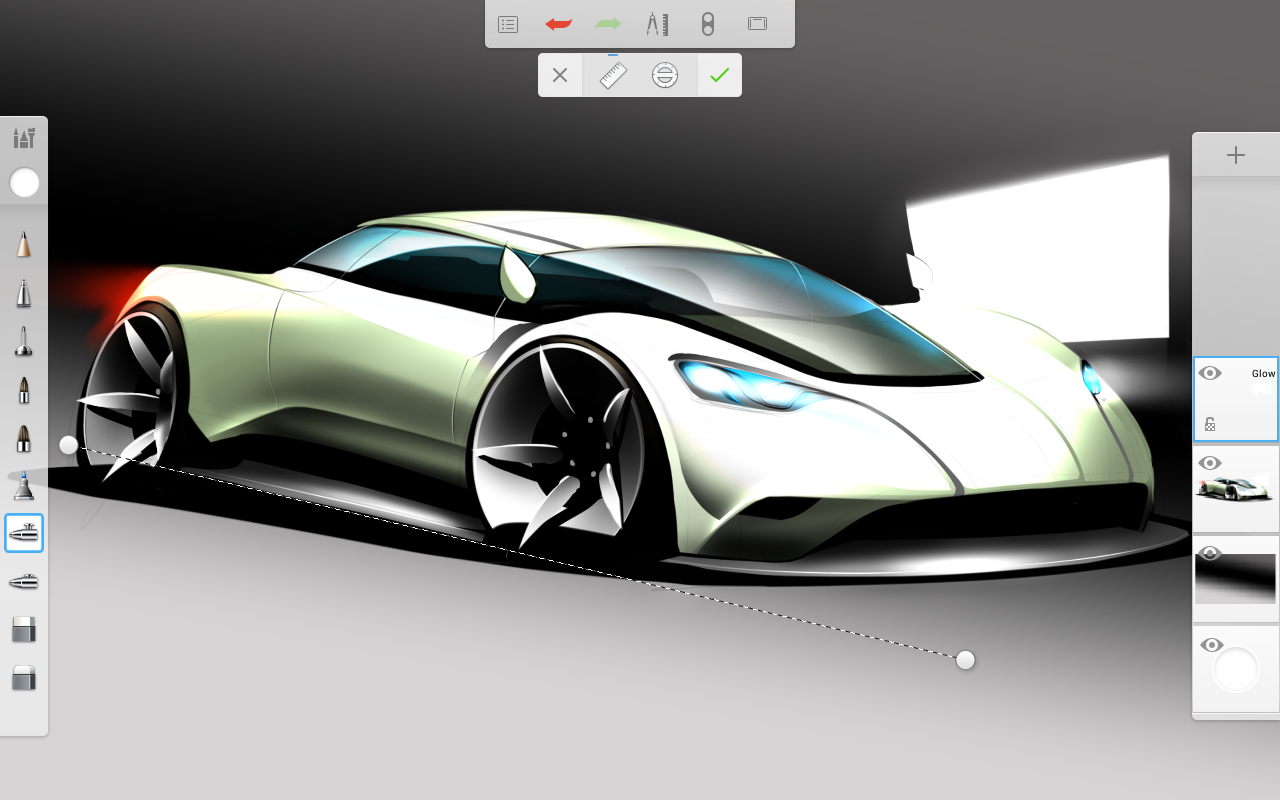
Autodesk SketchBook - screenshot
A sample SketchBook screen.
SketchBook is an entire Autodesk product line, spanning platforms from mobile devices to serious desktop workstations. Autodesk supports the product line at its own website, https://www.sketchbook.com/. You can download SketchBook from the Google Play app store. Follow this link: https://play.google.com/store/apps/details?id=com.adsk.sketchbook.

One little note about the reviews at Google Play: many SketchBook reviewers gripe, and with some (but not a lot of) justification, that the free version of SketchBook is more like an advertisement for the Pro version, and that they feel deceived in some way in having to upgrade to Pro to get the tools they need. Eh. Think of it as an evaluation copy. Avoid the disappointment and frustration that the reviewers experienced, by planning from the start to spend the $3.99 and upgrade to Pro immediately. That way you will know exactly what you are getting and you won't feel like anybody's trying to pull a fast one on you.

Besides, the SketchBook app is easily worth $10 or more. And the Markers app is worth $2 or $3. They're both bargains at their current prices.

Thursday, October 6, 2011

In Honor of Steve Jobs

Better writers than me have written better eulogies than this for Steve Jobs in the past 24 hours. I recommend the ones at Wired and NPR. I'm sure Time will have something worthwhile to read. Since I don't have anything new or exclusive to add, this entry will be short.

Steve Jobs died of pancreatic cancer on Wednesday, October 5, 2011. He was 56 years old. He left behind a wife and four children, whom he loved and whom he carefully kept out of the spotlight during his very public career. He also left behind a vibrant computer company, one that in its own way (and in his own way) defined consumer computing, leading the way for Microsoft and IBM, and later for Google, Motorola and all the other "me-too" companies.

What did he do?  Well, an automobile is a complex piece of machinery, and yet every single automobile in the world is controlled in exactly the same way, with a steering wheel, a gear shift, and two pedals.  Jobs did the same thing for computers and computing.  Outside of what he has left for his family, that may be his greatest legacy.

With the iPhone, he also reinvented the mobile telephone.  And with Pixar, he reinvented animated, feature-length, family movies.

 He is named as inventor or co-inventor on over 300 patents, covering computers, telephones, music, and more.  Steven Levy, in his eulogy in Wired, named Jobs' six biggest technical and business accomplishments:
  • the Apple II computer
  • the Macintosh computer
  • Pixar Studios
  • the iPod
  • the iPhone
  • the iPad
In the NPR story, Robert McNamee, a venture capitalist, called Jobs a modern-day "Thomas Edison."  Moviemaker Steven Spielberg (what is it with all these Stevens today?) echoed that sentiment.

Whether you own an Apple product or not, Steve Jobs has had a profound and lasting effect on your life.

Edit:  I added the picture.  Not sure what the original source was; I swiped it from FB.

Thursday, March 17, 2011

One great app for iPad

UPDATE, 25 SEP 2017: The Jot! app has become an orphaned app. If you have it on your device, keep it. It will never be updated. If you don't have it, I'm sorry. I don't know of a suitable replacement. The link to the author's website contains a short explanation for its discontinuance. The link to the app store points nowhere. I've left both links intact.

Unfortunately, the two screenshots in this article have also disappeared. Blogger detected an HTTPS issue with them and offered to fix the page for me. I accepted its offer, and now it won't give me back my pictures.
 
I have already written about the fact that, although Apple's App Store has thousands of apps for the iPod, iPad and iPhone, the vast majority of them are junk. Because of this fact, I have been very choosy about the apps that I download. But I finally found a really good one - two, actually.

Autodesk made their name and their fortune on AutoCAD, arguably the most well-known CAD software on the planet. They added to their product portfolio over the years, through clever R&D and through judicious acquisitions. I never thought of them as players in the app market.

This week I was looking for a quick and easy sketching app. I found one called Jot!, which works very well. (I think the exclamation point on the name is stupid, but everybody else likes it...) I'm increasingly pleased with it - the more I use it, the more I like it. It's simple and it's well executed. It's uncluttered. It's fast. It has some limitations, but for the purposes of brainstorming and doing quick sketches, it's fine.

Jot! is delightfully intuitive. It's meant to replace a pencil and yellow pad of paper in a meeting, or even the Expo markers and whiteboard at the front of the conference room. It doesn't try to do more than that, and that focus on simplicity is the key to its success. And then the fact that you can share Jot! sketches with other Jot! users around the globe, or that you can email them as PDF files to anybody in the world, serves to make it universally useful.

A Jot! screenshot. Yes, it really is that simple.

Jot! comes in three flavors:
  • Jot! for iPhone, $2.99
  • Jot! for iPad, $4.99
  • Jot!Free for iPad
Then I thought I might like something with more features and more horsepower than Jot!. After snooping around for a long time (way too long) in the App Store, I found SketchBook, from Autodesk. It also comes in several flavors:
  • SketchBook Mobile, $0.99 for iPhone/iPod Touch
  • SketchBook MobileX, free for iPhone/iPod Touch ("X" for "Express")
  • SketchBook Pro, $7.99 for iPad
  • SketchBook Express, free for iPad
I had no idea that big companies like AutoDesk were writing stuff for iOS. If you're familiar with the full-size SketchBook Pro on the Mac OS X, then it should come as no surprise to you when I say that this is the best app I've seen yet for the iOS platforms. This is a well-crafted application, and once you get to know it, it does almost everything that the full-size version does.

The "Express" versions of SketchBook go far beyond Jot!'s simple capabilities. I like both Jot! and SketchBook. They were written for different purposes: Jot! for simple sketching tasks, and SketchBook for serious artistic creation. There is considerable overlap between the two.

The current "Express" versions of SketchBook also have a couple of serious bugs. For one thing, if you try to import a photo into SBX, or SBMobileX, the app crashes. Eh. So don't do that. If you pay real money for the Pro version (come on, only 8 bucks for the iPad, one buck for the iPod), you avoid those limitations entirely.

The SketchBook user interface takes some getting used to - about ten minutes the first time you use it, and about two minutes every time after that. That's not much. Serious artists may be frustrated by the limitations of the software, which are naturally dictated by the limitations of the hardware. Eh again. Go find a real Mac with a full-size screen.

iPhone Screenshot 1
A SketchBook screenshot. The real thing looks a lot better than this.

Jot! is from a two-person company called Tabula Rasa Labs. I know it's not even fair putting them in an article alongside Autodesk. That's like putting a jet ski in a photo next to a cabin cruiser - or an aircraft carrier. Honestly, I sat down to write an entry extolling the virtues of SketchBook Pro, and Jot! just kept working its way into the article. So even though the title of this entry is "One great app," I'm not averse to endorsing two great apps which, on the surface, do pretty much the same thing but which, after a closer look, are vastly different in scale and horsepower. I say get 'em both.

p.s. Remember, I'm not a shill. My opinions are not for sale. I only write what I feel like writing. See my "blogging for dollars" entry if you're not sure you believe me.

p.p.s. Friday, March 18: After using Jot! at home last night, I revised this article this morning. The more I use Jot!, the more I like it. I still can't believe I sat down to write an article about SketchBook Pro and ended up with this article.

Monday, November 1, 2010

More about apps (iPod, iPhone, iPad)

Here's why I say that 95% of apps are only marginally useful / relevant / practical. You may think that this entry is frivolous / trivial / unrealistic. I can live with that assessment. (You're still reading this, aren't you?)

I had heard about the Bubble Wrap app. I searched for "bubble wrap" at the App Store and downloaded a couple of promising entries. I was disappointed to find out that they were games, with time limits and scores. Not only that, but if you didn't move fast enough, some little gremlin snuck around behind you and unpopped all your popped bubbles.

In the real world, everybody pops bubble wrap. I haven't yet met anybody who can resist it. But in the real world, popping bubble wrap is not a competition. On one end of the spectrum it's simple, mindless fun, and at the other end it's therapeutic - sometimes group therapy, even.

I wanted an app that was as simple, mindless and therapeutic as real bubble wrap, not something that hijacks that relaxing experience and contaminates it with goals, deadlines, and stress. Heck, if i wanted goals, deadlines and stress, I'd put down my iPod and go back to work.

(I think that the author wrote this entry with his tongue planted firmly in his cheek. Maybe.)

Looking for iPod touch 4G accessories

I need your help finding some stuff for an iPod touch 4G.

I've done research all over the Web, and it's overrun by marketing hype, biased reviews (you know, shills), and advertising. I've looked in the local stores, and the selection is limited and overpriced. I figured I'd ask for help from my loyal readers.

I got a fourth-generation iPod touch as a gift, and I've already got scratches on the metal case. Eventually I'm going to scratch the glass front, or simply drop the thing, and that would be bad. I need to buy some protection for it.

What have you had experience with, and what would you recommend? Specifically, I'm looking for recommendations on:
  • screen protector
  • hard-shell or soft-shell case
  • armband-style carrying pouch
While I'm thinking about it, I must say a word or two about apps. The first word is disappointing. The second word is wasteland, as in "Wow, what a wasteland." The current state of Apple's App Store is like the early days of the Mac, and the early days of the World Wide Web: there's a lot of content out there, and 95% of it is garbage. I'd estimate that 95% of what's at the App Store is poorly written, poorly debugged, and only marginally useful / relevant / practical. There's not a lot to differentiate a good app from a bad one: the reviews vary so widely as to call the credibility of all of them into question; and you can't even use purchase price as a reliable differentiator.

(I'll be adding to the wasteland, creating some apps for my employer.)

As for the music, well, I'm joining the revolution late, but not too late. I've finally become sold on digital / downloaded music. Among the massive contemporary offerings, I found some obscure gems. I found Aerie, an early John Denver album, formerly only available on CD as a horrendously overpriced import (if at all), now available at high quality and costing almost the same as it did back in nineteen-seventy-mumble. I also found Greatest Highs, a giant compilation album from the Kottonmouth Kings, a hip-hop group who specialize in raunchy (and mostly inappropriate) lyrics extolling weed and other stuff that I probably shouldn't be thinking about.

Yeah. So please, give me your recommendations for screen covers, cases, and exercise pouches. As always, your comments go through a moderation/approval screen, but unless they're an obvious sales job, they'll be approved instantly.

(I can't wait to see what AdSense offers up with this posting!)